LASER CUTTING: QUESTIONS AND ANSWERS
We have gathered the most common questions about laser cutting and about ordering through LeikePaja: equipment and limits, materials, prices, delivery and drawing requirements.
THE BASICS
What is laser cutting?
In laser cutting, a powerful beam of light focused to a small spot melts the metal, and an assist gas blows the molten material out of the kerf. The machine follows the path in the drawing, so identical parts can be cut again and again to the same dimensions. Today's industrial machines are mostly fibre lasers. Read more about fibre laser technology.
What is the difference between laser cutting and flame cutting?
Laser cutting is more accurate, faster on thin and medium plate, and leaves a cleaner edge. Flame cutting (oxy-fuel cutting) suits thick steel plate, but the edge is rougher and the tolerance looser. At LeikePaja, S355 steel is laser-cut up to 25 mm (tolerance ±2 mm), and 30 and 40 mm plate is flame-cut (tolerance ±5 mm).
What is kerf?
Kerf is the width of the slot the laser beam cuts, typically about 0.1–0.3 mm on thin sheet and wider on thick plate. The cutting software compensates for it automatically, so draw the part to its real dimensions and don't add kerf yourself.
EQUIPMENT AND LIMITS
Up to what thickness can steel be laser-cut?
It depends on the machine's power. On machines of around 3–4 kW, good cut quality typically reaches about 12–16 mm and the maximum is about 20–25 mm. According to manufacturers, a 12 kW laser can cut up to about 35–40 mm, but laser-cutting plate that thick is no longer practical. NitroCut's 12 kW fibre laser cuts S355 steel up to 25 mm, and 30 and 40 mm plate is flame-cut.
Why does a higher-power laser cut faster?
More power means the same plate cuts faster, and thicker plate can still be laser-cut. The difference is clearest on medium and thick plate. Laser power has grown in recent years, so thicknesses that used to be flame-cut are now laser-cut more accurately and with a cleaner edge.
How large can a part be, and what are the tolerances?
The largest part is 1,500 × 3,000 mm and the maximum thickness 40 mm. Tolerance is ±2 mm for laser cutting and ±5 mm for flame cutting. If you need tighter dimensions, the part has to be machined after cutting, as LeikePaja does not do machining.
What is the smallest hole that can be cut?
For laser cutting, the hole diameter must be at least the plate thickness, for example at least 10 mm in 10 mm plate. For flame cutting the smallest hole is 1.25 × thickness, so 50 mm in 40 mm plate. The drawing tool checks holes, including square holes and slots, when you add the part to the cart. Holes are through-holes; countersinks are not made.
MATERIALS AND GRADES
Which materials can I order from LeikePaja?
There are four materials: steel S355 (1–25 mm by laser, 30 and 40 mm flame-cut), wear plate Hardox 400 (6, 8, 10, 15 and 20 mm), stainless steel 1.4307, i.e. grade 304L (1–10 mm), and aluminium 5754 (1–10 mm). All thicknesses are listed on the materials and thicknesses page.
Can I get other steel or aluminium grades?
Not at the moment. Only the grades and thicknesses listed above can be ordered. Acid-resistant stainless steel or other aluminium alloys, for example, are not available.
Does a laser-cut steel part rust?
S355 structural steel rusts like any uncoated steel, and laser cutting makes no difference either way. For outdoor use, paint or galvanise the part, or choose stainless 1.4307 or aluminium 5754 instead.
Can aluminium be laser-cut?
Yes. Aluminium cuts well with a fibre laser and is widely used in lightweight structures. LeikePaja offers aluminium 5754 in 1, 2, 3, 4, 5, 6, 8 and 10 mm.
ORDERING AND PRICES
How is the price calculated?
The price is based on material, thickness, cutting path length and pierces (holes), and you see it instantly while drawing. Prices include Finnish VAT of 25.5%. A start-up fee and delivery are added to the order. These are shown in the order breakdown before you send the order.
Parts chosen from the ready-made parts library also carry a design fee.
When and how do I pay?
You pay only after the workshop has checked and approved your drawing, and always before cutting. Payment methods are card, Apple Pay, Google Pay, MobilePay and Finnish online banking.
How does delivery work, and how long does an order take?
Parts are sent as a home parcel (max. 35 kg and longest side approx. 1.7 m per parcel); heavier orders go by freight priced by weight. You can also collect the parts in Lappajärvi with no delivery charge. The workshop usually checks the drawing within 1–2 working days and sends a confirmation. Cutting typically takes 1–5 working days depending on order size and workload, and the estimate is given in the confirmation.
What should the DXF file be like?
The DXF must be a cutting file for the part at 1:1 scale in millimetres: the part outline and holes as continuous, closed lines. DWG files and dimensioned assembly drawings cannot be used. When you add the part to the cart, the tool checks for open contours, holes that are too small and the maximum size. If you don't have CAD software, you can draw the part directly in your browser.
Can I draw several parts or an assembly in one drawing?
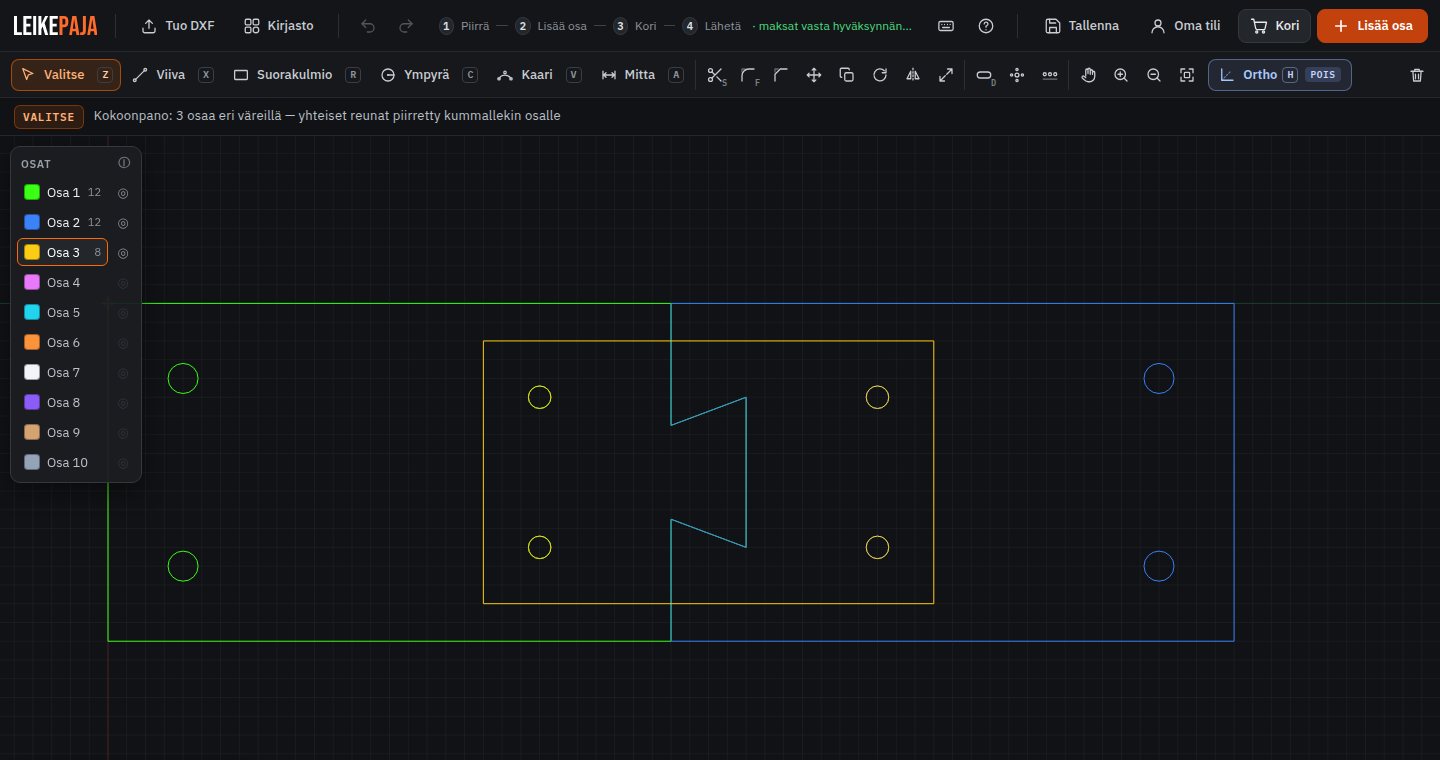
Yes. The part bar in the drawing tool has 10 colours, and each colour is its own part. Different colours may overlap, so you can fit parts to each other: tabs and slots, dovetail joints and holes for stiffeners. The eye button shows one part at a time. The Add part button splits the assembly into parts, and each part is checked and priced separately. Thickness and quantity are chosen per part in the cart.
The same works with a multi-part DXF file: if the file contains several separate parts, the tool detects them and adds each to the cart as its own row. Leave clearance in the fits, as the tool does not check whether the parts fit together.
Can a company order on invoice?
Yes, through the business portal. Request credentials from info@leikepaja.fi. In the portal prices are shown excluding VAT, orders are placed on invoice, dozens of DXF files can be imported at once and parts can be tagged with position, project and orderer details. Quotes can be saved as PDF, and previously ordered parts are kept in a parts library for repeat orders.
DRAW A PART, SEE THE PRICE
Draw a part in your browser, import a DXF or pick a ready-made part from the library. The price updates instantly, and you only pay once the workshop has checked your drawing.
Questions? info@leikepaja.fi
General thickness limits by power class were checked in September 2026 against manufacturers' publications and are indicative. Information about LeikePaja (materials, limits, prices, delivery) is the service's own. Sources: