CAD SOFTWARE FOR LASER CUTTING
The idea is usually clear: a mounting plate, a bracket or a flange. But a laser cutting shop needs an accurate 2D drawing, usually a DXF file. This article compares the most common CAD programs, with prices, and explains honestly what LeikePaja's browser-based CadOnline is good for and what it is not.
WHAT IS A DXF FILE?
DXF (Drawing Exchange Format) is a file format originally developed by Autodesk, and it has become the most common format for laser cutting. It describes the part's outline and holes as 2D geometry: lines, arcs and circles.
Almost every CAD program can save a DXF. The challenge is making it right: at the correct scale, with closed outlines and nothing extra such as dimension lines, text or title blocks.
Only the shapes to be cut, at 1:1 scale in millimetres. Outlines must be closed. Several parts in one file are fine; they are split into separate lines.
DWG files and dimensioned assembly drawings are not accepted. On the laser, the smallest hole diameter is at least the sheet thickness.
THE MOST COMMON CAD OPTIONS
The prices and free-version details below were checked in September 2026 on the vendors' own websites. They are list prices in US dollars as published by the vendors. Prices in euros may differ and promotions change them, so check the current price before you buy.
Autodesk Fusion (formerly Fusion 360)
Fusion is a versatile 3D design and manufacturing program. It is very capable, but a simple sheet part still takes several steps: a sketch or 3D model, then a DXF export with the right settings.
- Free for personal, non-commercial use (Fusion for personal use). According to Autodesk it is meant for home use, and annual revenue must be under USD 1,000.
- The free version has limits, such as restricted import and export file types and reduced drawing and documentation features.
- Commercial use requires a paid subscription, Autodesk's list price USD 680 per year. 30-day free trial.
- A good choice if you need 3D modelling, assemblies or CAM toolpaths.
Autodesk Inventor
Inventor is a professional 3D CAD program for mechanical design. Sheet metal parts, assemblies and drawings are all handled in one program. At LeikePaja's own cutting shop, design work is done with Inventor and DraftSight too.
- Paid subscription, Autodesk's published list price USD 2,585 per year per user.
- 30-day free trial, no permanent free version.
- Makes sense when you design machines and assemblies for a living.
DraftSight
DraftSight by Dassault Systèmes is a 2D CAD program that feels familiar to anyone with an AutoCAD background. It opens and saves DWG and DXF files, so producing a cutting file is routine for it.
- No free version any more, according to the vendor.
- Professional (2D) USD 299/yr and Premium (adds 3D modelling) USD 599/yr at the vendor's list prices.
- 30-day free trial of the Premium version.
FreeCAD
FreeCAD is a free, open-source parametric 3D modeller. It has improved a lot in recent years, but the interface takes some getting used to, and turning a 3D model into a cut-ready 2D DXF takes a few steps.
- Free, no licence fees
- Windows, macOS and Linux
- A good choice if you want to learn parametric modelling at no cost
LibreCAD
LibreCAD is a free, open-source 2D CAD program. It is lightweight and works with DXF files, so it is well suited to drawing cutting files directly. Like any traditional CAD program, it takes a little learning.
- Free (GPLv2 licence), no trials or annual fees
- Windows, macOS and Linux
- 2D only, no 3D features
Inkscape
Inkscape is a free vector graphics editor, widely used for engraving and decorative shapes. It can save DXF files, but for technical parts you need to be careful with units and scale so the part does not come out the wrong size.
- Free and open source
- Good for free-form and decorative shapes
- Precise dimensions and hole patterns are harder than in a CAD program
Summary table
Scroll the table sideways →
| Software | Type | Price (list) | Free use | Installation |
|---|---|---|---|---|
| Autodesk Fusion | 3D CAD/CAM | USD 680/yr | Personal, non-commercial use with limits | Required |
| Autodesk Inventor | 3D CAD | USD 2,585/yr | 30-day trial | Required |
| DraftSight | 2D (Premium also 3D) | USD 299–599/yr | 30-day trial (Premium) | Required |
| FreeCAD | 3D, parametric | Free | Yes, open source | Required |
| LibreCAD | 2D | Free | Yes, open source | Required |
| Inkscape | Vector graphics | Free | Yes, open source | Required |
| CadOnline | 2D cutting parts | Free to use | Yes, you only pay for parts you order | In the browser |
Checked in September 2026 on the vendors' websites (sources at the end of the page). Prices are US list prices; euro prices may differ.
WHAT CADONLINE DOES
CadOnline is LeikePaja's own drawing tool, and it runs in your browser. Button names below are given in Finnish as they appear in the tool, with a translation. It is built for one job: drawing and ordering 2D laser-cut parts. There is nothing to install, and you can start drawing straight away.
Drawing tools
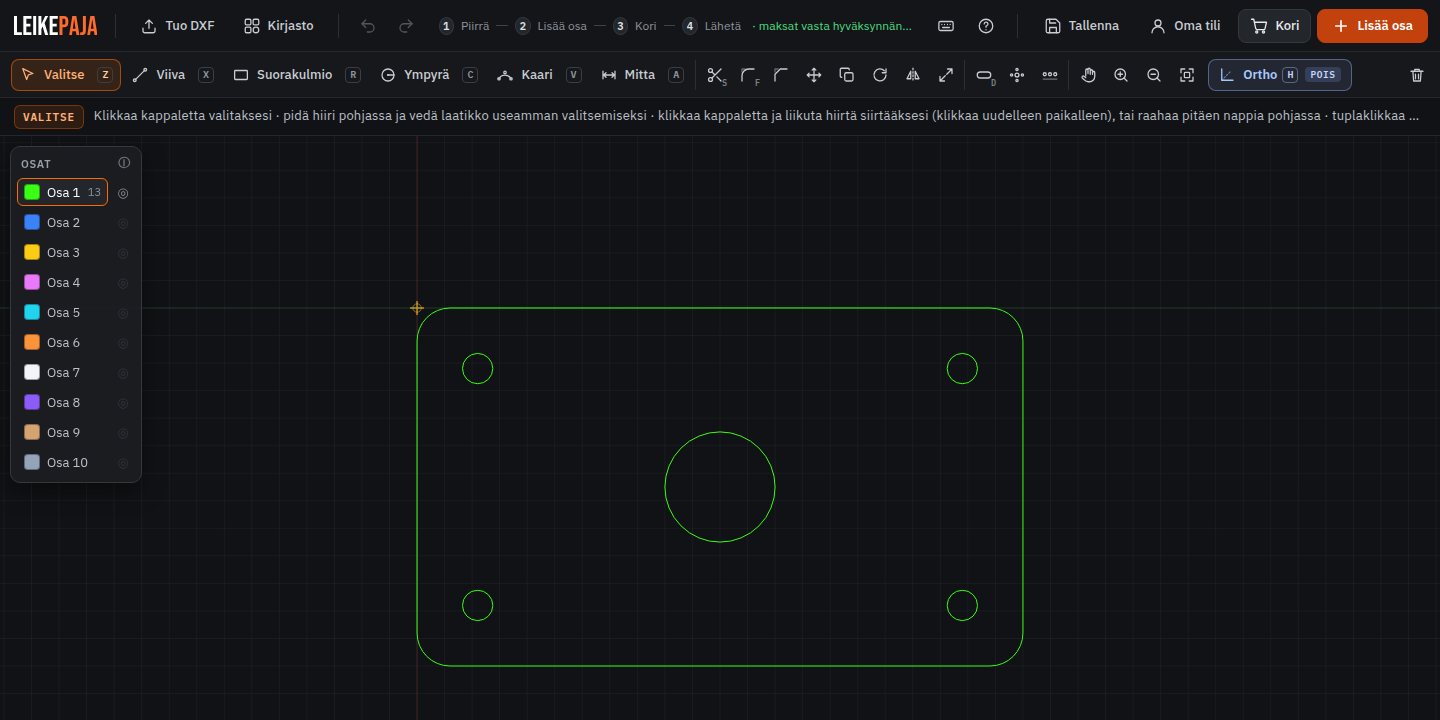
You get line, rectangle, circle, arc, dimension, fillet, mirror, rotate and copy, plus hole rows and hole circles. Ortho lock has its own button, and keyboard shortcuts are shown right on the buttons. All dimensions are in millimetres.
Checks, then straight to the cart
When you press Lisää osa (Add part), the tool checks the drawing for open outlines, holes that are too small (including square holes and slots) and the maximum part size. If everything is fine, the part goes straight into the cart with no extra questions.
In the cart you set each part's name, material, thickness and quantity, and you can add a note. Each row shows a preview, and you can open the part back in the drawing tool to edit it.
Price right away
The price is based on material, thickness, cutting path and pierces, and you see it immediately. So you know what the part costs before you send anything. Prices include Finnish VAT at 25.5%.
The start fee and delivery are shown in the order breakdown before you send the order, and you only pay after the cutting shop has checked and approved your drawing.
2D assembly with colours
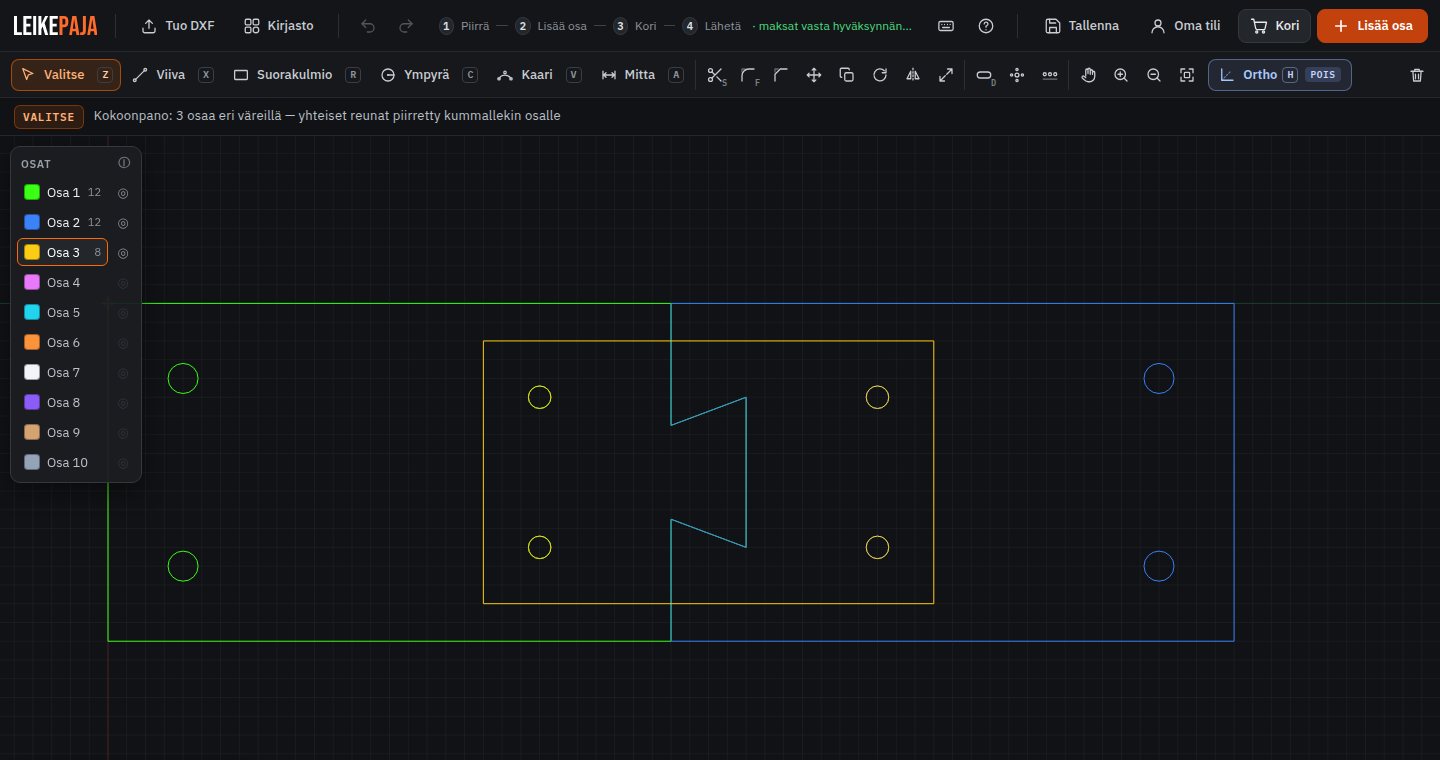
The parts panel has 10 colours, and each colour is its own part. Parts of different colours may overlap, so you can fit parts together: tabs, slots, dovetail joints and holes for stiffeners. The eye button shows one part at a time.
When you press Lisää osa, the assembly is split into separate parts. Each one is checked and priced on its own, and each can have its own thickness. Tip: leave clearance in your joints, because the tool does not check how the parts fit together.
DXF import
If you have already drawn the part elsewhere, for example in Inventor, DraftSight, Fusion or LibreCAD, the Tuo DXF (Import DXF) button opens the file in CadOnline. The same checks and pricing apply to imported parts. A multi-part DXF also works as an assembly, and the parts are separated and priced individually.
Ready-made parts library
The library has ready-drawn parts, such as shaft shims, brackets and lugs for machines. Library parts carry a design fee.
Oma tili (my account)
With a free Oma tili account you can save your designs and open them later, and your order details are filled in for next time. You do not need an account to draw.
WHAT CADONLINE IS NOT FOR
CadOnline does not replace a full CAD program, and it is not meant to. It draws individual 2D sheet parts for cutting. If you need a 3D model, a flat pattern for a bent part, strength calculations or dimensioned drawings, you need Inventor, Fusion, FreeCAD or similar. In that case the best combination is often this: design in your own program, save the cutting parts as DXF and import them into CadOnline for the price and the order.
Full CAD program
CadOnline
CadOnline also does no machining, such as countersinks or surface facing. Cut holes always go straight through. Available materials are S355 steel, Hardox 400 wear plate, stainless 1.4307 and aluminium 5754; see materials and thicknesses.
SUMMARY — WHAT FITS YOUR NEEDS?
| Situation | Recommendation |
|---|---|
| Simple sheet part, quick order | CadOnline |
| DXF already done | Import the DXF into CadOnline |
| Several sheet parts that fit together | CadOnline 2D assembly |
| 3D models, assemblies, professional use | Inventor or Fusion |
| Learning 3D modelling for free | FreeCAD |
| AutoCAD-style 2D drafting | DraftSight or LibreCAD |
| Decorative shapes, engraving | Inkscape |
The easiest way to find out whether CadOnline suits you is to try it. Draw a part or import a DXF, check the price and order only if it works for you. The ordering steps are explained in more detail in the ordering guide and on the How it works page.
TRY IT IN YOUR BROWSER
Nothing to install. Draw a part or import a DXF, see the price instantly and add the part straight to the cart.
Sources (prices and free-version details of other programs checked in September 2026):
- Autodesk Fusion for personal use: autodesk.com/products/fusion-360/personal
- Fusion for personal use vs. Autodesk Fusion (USD 680/yr): autodesk.com/products/fusion-360/blog/fusion-for-personal-use-vs-autodesk-fusion
- Autodesk Fusion, buy and trial: autodesk.com/products/fusion-360/buy
- Autodesk Inventor, subscription types and price: autodesk.com/blogs/design-and-manufacturing/autodesk-inventor-subscription-types
- Autodesk Inventor, buy and trial: autodesk.com/products/inventor/buy
- DraftSight, prices and trial: draftsight.com/how-to-buy
- DraftSight Professional: draftsight.com/product/draftsight-professional-2d-cad-software
- FreeCAD, downloads: freecad.org/downloads.php
- LibreCAD: librecad.org
- Inkscape: inkscape.org